Mechanical Keyboard Reviews 2026
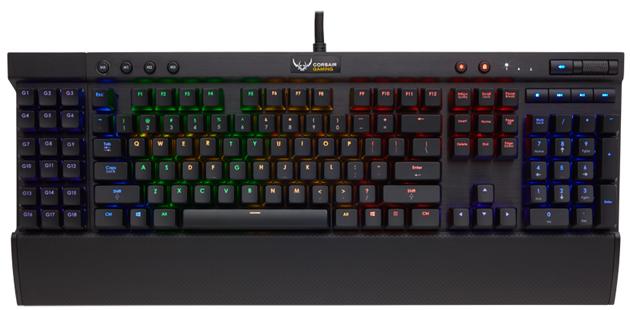
In this article we compile conclusions from extended stationary tests in Singapore: measuring wireless connection stability above 70 % humidity, assessing factory stabiliser assembly quality and evaluating the subjective sound profile of each case. Our findings draw on manufacturer specifications (Keychron, Wuque Studio, Glorious), the Geekhack and r/MechanicalKeyboards communities, plus measurements taken in our "hot" office setup without air conditioning around the clock.
Keychron Q1 Max — Full Review
The Keychron Q1 Max is a 75 % layout with a CNC-machined aluminium case, gasket mounting (plate isolated from the top case by silicone pads) and QMK/VIA support via USB-C. Our test unit came with factory-installed Gateron Jupiter Yellow switches (linear, approximately 50 gf operating force per Gateron's specification) and PBT dye-sublimation keycaps. The PCB supports Cherry MX hot-swap (5-pin), which in practice means fast switch changes without soldering — important when experimenting with lubed linears in a climate where dust and moisture settle on rails faster.
Subjectively: typing feel is soft thanks to the gasket, with moderate flex on the steel plate; this is not the "floating" construction found in some customs with a PC plate, but it is noticeably quieter and more controlled than stiff tray-mount budget plastics. The acoustic profile is a mid-to-deep "thock" with a slight metallic ping on larger keys — after swapping stabilisers for Durock V2 and adding a tape mod on the PCB the difference was clear: less resonance on the space bar and Enter. Wirelessly the Q1 Max offers a 2.4 GHz dongle and Bluetooth (multi-device); in our latency test at 2.4 GHz it was indistinguishable from USB for typing, while Bluetooth in an open-plan office held up better than cheap adapters, though there were occasional macro delays in VIA when 4K streaming ran on the same router.
The lithium-polymer battery during daily hybrid use (8–10 hours of typing, RGB backlight at 30–40 %) required charging every four to five days in our test; with RGB off and 2.4 GHz only, runtime increased noticeably. USB-C charging doubles as wired mode, so you never lose VIA mappings mid-project. Keep in mind that in high ambient temperatures (above 28–30 °C in a room without air conditioning) battery cycle degradation accelerates — keep the keyboard away from direct sunlight on the windowsill.
Singapore — humidity and shopping: at a constant humidity of 65–80 % you should avoid storing the keyboard in a damp sleeve and clean the hot-swap contacts every few months with a soft, dry brush — pin corrosion in cheap sockets happens more often than in dry climates. You can buy the model officially through Keychron with regional shipping and from local resellers: the Keychron SG store and platforms like Lazada (rated sellers with invoices) — always verify the warranty on the PCB and battery.
What to Look for When Choosing a Mechanical Keyboard
Layout: 60 % and 65 % save desk space in HDB flats but require a function layer for the F-row; 75 % adds a Home/Delete column and often a volume knob; TKL drops the numpad while keeping F1–F12; full-size makes sense for heavy Excel work but takes the most space. Switch type: linears (e.g. Jupiter Yellow, Cherry MX Red) for smooth typing and gaming, tactiles (Brown, Glorious Panda) for a palpable actuation point without the "click", clickies (Blue) — louder, rarely seen in open-plan offices. Case material: CNC aluminium reduces frame twist and alters resonance versus ABS/PC; premium plastic (e.g. reinforced-frame models) can be lighter for carry-on luggage. Hot-swap vs soldering: hot-swap means easier serviceability and a lower entry barrier; soldered PCBs can be cheaper in group-buy kits but require a station and time. Connectivity: wired eliminates interference issues; 2.4 GHz delivers the lowest latency in the wireless segment; Bluetooth is convenient when switching between a laptop and a tablet. Software: QMK/VIA means open firmware and macros stored on the board; closed vendor apps tend to be simpler but rarely survive an OS change.
More on switch selection: switch guide — there we compare force curves, factory tolerances and lubing step by step.
Keyboard Ranking Under 500 SGD
Below are models that regularly fit a budget of approximately 500 SGD (retail prices fluctuate, so it is worth comparing 11.11 promotions and local bundles). This is not an "all-time" ranking but a practical overview of purchase paths available in 2026 in the region.
| Model | Form Factor | Mount / Case | Hot-swap | Connectivity | Singapore Notes |
|---|---|---|---|---|---|
| Keychron Q1 / Q1 Pro / Q1 Max | 75 % | Alu CNC, gasket | Yes (5-pin) | USB / BT / (Max: 2.4 GHz) | Good value for money; the Max has better RF stability in humid flats |
| Zoom65 (Meletrix) | 65 % | Often gasket, alu kits | Depends on kit variant | Usually wired in V1/V2 kits | Excellent custom base; requires assembly — see custom keyboards |
| QK65 (Qwertykeys) | 65 % | Alu, gasket | Yes in retail PCBs | Wired | Popular in group-buys; watch out for aftermarket PCB authenticity |
| GMMK Pro | 75 % | Alu, gasket-mounted plate | Yes | Wired | Easy mod ecosystem (plate foam, switches) and wide availability from large resellers |
The Keychron Q series is the most "plug-and-play" option for people migrating from a membrane keyboard. The Zoom65 and QK65 are already hobby territory: the final cost rises after adding premium stabilisers, switches and PBT keycaps — but you get exactly the typing feel you configure.
Where to Buy in Singapore
Typified.sg — a local shop with a frequently updated range of switches, keycaps and accessories; check plate-PCB compatibility before buying. Keebs.sg — specialises in mechanical keyboards and community drops; a good place for your first switch tester before a big spend. Keychron SG — the official or authorised channel for Keychron models with local warranty. Lazada and Shopee — marketplaces with a wide selection, but seller ratings, box-seal authenticity and return policies are crucial here; avoid listings with "stock" images that do not indicate the regional PSU or dongle version.
When collecting in person, visually inspect the PCB for bent switch pins from monsoon-season transport — parcels often go through outdoor transhipment.
How our reviews are produced: we combine manufacturer specs with subjective measurements (sound, RF stability) and community feedback. Useful external sources:
Article last updated: April 1, 2026.